Staff
What is staff used for?
Staff is used to list your municipalities staff, assign them categories of which boards and committees they are on along with their contact information.
Where do staff members show up on my website?
Staff will appear on the "Staff" page as seen here on our template site.
Staff Fields
How do each of the staff fields work?
Full Name
- Enter the first and last name of the staff member.
Staff Department
- Here is where you can select which "department(s)" the staff member belongs to.
Creating a New DepartmentWe have set up departments for you already. You are able to click the "+ Create new" button to add a new one but be careful not to add too many as it starts to clutter the website.
Role
- Staff members job position. (ex: clerk, member, town inspector etc.)
Phone Number
- Staff members phone number.
Address
- The address of the staff member, which city, town, state and zip code they live in.
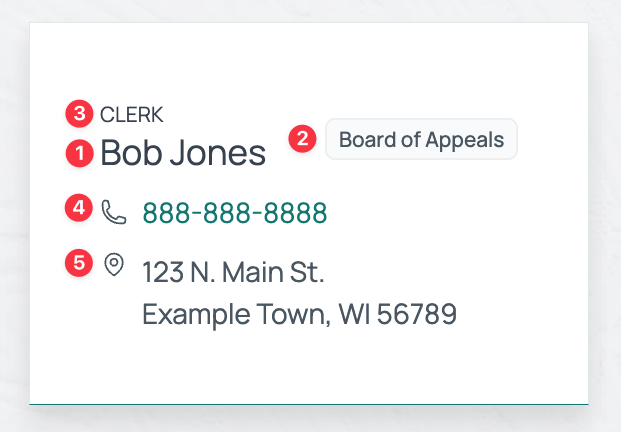
Where does each field display on my website?
For a live example of staff cards visit the template's staff page.
- Full Name
- Staff Department
- Role
- Phone Number
- Address, City/Town, State, Zip Code